You do not need a class full of players to enjoy Blooket. Solo games let you play on your own, at your own pace, with any question set you like. Pick a set from Discover or use one of your own sets. Choose a game mode. Press Play. You are in the game within a minute. No game code, no host, and no waiting for classmates to join.
Learning how to play a solo game in Blooket takes less time than one round of the game itself. The steps are short and the same every time. This guide walks through both ways to start, the eleven modes you can play solo, the difference between solo, live, and homework games, and the mistakes that waste your first session.
What Is a Solo Game in Blooket?
A solo game is a Blooket game you play alone. You answer the questions yourself. You earn your own score. No other players join your game. Nobody else sees your leaderboard. It is the same Blooket you know from class, minus the competition. That makes it the best way to practice, review, or just play for fun when nobody else is around.
Solo games run on the same question sets as live games. You can use a public set from Discover or one of your own sets from My Sets. Blooket says users have created more than 20 million question sets. You will rarely need to build your own from scratch. Search for your topic, open a set that fits, and start. If you made the set yourself, it is already waiting in My Sets.
Solo play is also self-paced. Live games move at the speed of the room. Solo games move at your speed. You can pause between questions, take your time on hard ones, and repeat a set until the answers stick. That control is why solo works so well for review. It turns Blooket from a race into a study tool.
How to play a solo game in Blooket is a question students ask most often after their first live game. They want the same fun without the class. The answer is simple. Solo is a built-in option on every set page and in every set menu. You do not need a special link or a teacher to start one for you.
How to Play a Solo Game in Blooket
There are two ways to start. Both take under a minute. Use the first way when you want a public set. Use the second way when you want one of your own sets.
Start With a Public Question Set
Open Discover from your Blooket dashboard. Search or browse for the question set you want to use. Blooket marks some sets as Featured, Verified, or Popular. Those are a good place to start when you want a set that other players already trust. Open the set to see its preview page. You will see the set title, its creator, the number of questions, and how many times it has been played. Select Play Solo. Blooket moves you straight to the mode screen.
Start With One of Your Own Sets
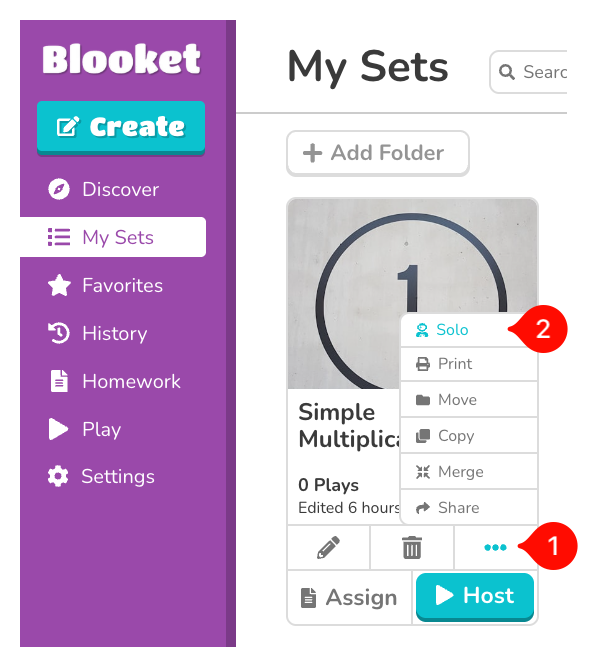
Open My Sets from your dashboard. Find the question set you want to play. Open the set menu and select Solo. The menu sits on the set card, next to the Host and Assign buttons. This route is best when you built the set for your own revision or your teacher shared a set with your class and you want to practice it again at home.
Choose a Mode and Press Play
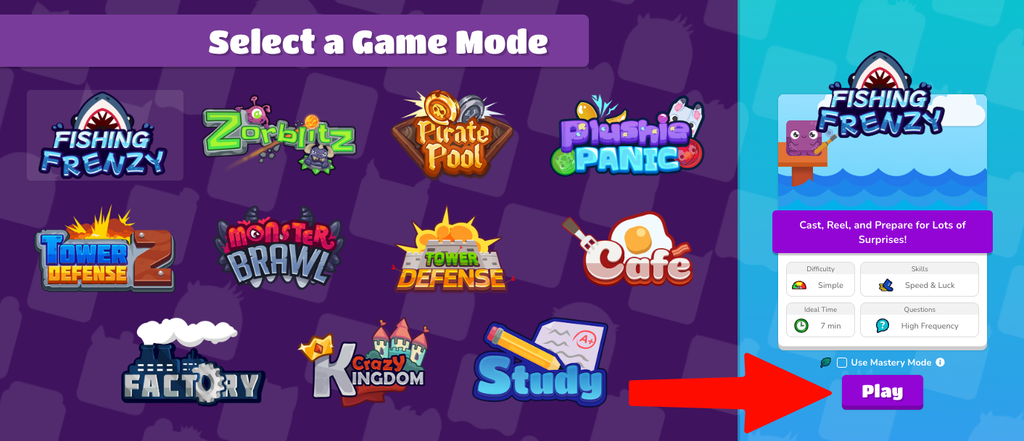
Once you pick Solo, Blooket shows the game modes that support solo play. Choose a mode. Select Play. The game starts. Some modes also let you continue a saved game. If a saved game is available, you can select it instead of starting a New Game. Tower of Doom, Café, and Tower Defense 1 and 2 support loading a past game you have not finished yet. That option matters when a long game runs out of time. You can pick up where you stopped instead of starting over. Once you know these steps, you know how to play a solo game in Blooket from any set, public or your own.
You need a Blooket account to play solo, because both routes start from your dashboard. Log in first, then open Discover or My Sets. The game itself is free. No paid plan is needed to start a solo game.
Game Modes You Can Play Solo
Not every Blooket mode works on your own. Eleven modes currently support solo play. The list below comes from Blooket’s own Help Center. Pick the mode that fits your mood. Want a calm review? Study is the pick. Want a full game? Tower Defense and Fishing Frenzy both work solo.
| Solo game mode | Best for |
| Café | Running a shop while you answer |
| Crazy Kingdom | Managing a kingdom through choices |
| Factory | Building and upgrading a factory |
| Fishing Frenzy | Casting lines and landing fish by weight |
| Monster Brawl | Battling monsters with correct answers |
| Pirate Pool | A pirate-themed luck game |
| Plushie Panic | A fast plush-collecting game |
| Study | Calm flashcard-style review |
| Tower Defense | Placing towers to stop enemy waves |
| Tower Defense 2 | The sequel with new maps and towers |
| Zorblitz | A quick arcade-style quiz battle |
Game mode availability can change. Treat this list as current for now. Blooket points players to its Game Mode Previews page for the latest list and an overview of each mode. Check there before you plan a session around one specific mode.
One detail in Blooket’s own article needs a note. An older section of the same page lists only seven solo modes. It includes Tower of Doom. The current list above has eleven modes and does not include Tower of Doom. The newer list is the one to trust. Tower of Doom still supports loading a saved game. The older text is not fully out of date. It is simply behind the current list. When a source disagrees with itself, follow the newest version and check the live mode screen. The screen never lies about what you can play today. Our Blooket Play guide covers live play too, if you ever want to take the same modes into a classroom game.
How to play a solo game in Blooket changes a little with the mode you pick. Study shows you flashcards and checks your recall. Tower Defense makes you spend gold on towers between questions. Fishing Frenzy sends you to the dock to cast and reel before the next question. The start is always the same. The middle is where each mode shows its own character. Try two or three modes with the same set and you will quickly find the one that fits how you like to review.
Solo vs Live vs Homework: Which One Should You Pick?
Solo, live, and homework games all use the same question sets. They differ in who plays, when you play, and who sets the pace. Pick the one that matches your situation.
A live game is the classroom classic. A teacher hosts and students join with a code. Everyone plays at the same time. It is social, fast, and competitive. It needs a host and a group. It runs on the host’s timer. Play live when you want energy and a room full of rivals.
A solo game is the same Blooket with only you in it. You start it yourself from Discover or My Sets. You set the pace. You can stop, repeat a set, or switch modes without asking anyone. Play solo when you want to practice, review for a test, or play for fun on your own.
A homework game is work a teacher assigns for students to finish on their own time. The teacher picks the set and the mode and sends it out. Students open it at home or in class and complete it before the deadline. Homework and solo look alike from the student side. The difference is who started it. Solo starts with you. Homework starts with your teacher. If you only want to practice on your own, learning how to play a solo game in Blooket is the skill that matters most.
Our Blooket Host guide explains live hosting step by step. You can see the host side too. If you only ever play solo, you will never need the host screen. If you ever run a game for friends, that guide is the place to start.
Do You Need Blooket Plus to Play Solo?
No. Solo games work on the free Blooket plan. You need a free Blooket account, because solo starts from your dashboard. You do not need a paid subscription to open Discover, pick a set, and press Play Solo. Every mode in the table above is open to free accounts.
Blooket Plus is a paid tier that adds hosting extras and customization options across Blooket. It does not gate solo play. A student with a free account and a student with Plus sit at the same solo mode screen. The difference shows up in hosting and account extras, not in whether you can play alone.
That free access is the point. Solo is the way Blooket reaches a student with no class, no teacher, and no budget. One account, one set, one mode. You are playing. How to play a solo game in Blooket costs nothing beyond the account itself. If a site ever asks you to pay for solo access, it is not Blooket.
Best Tips for Solo Play
Start with a Featured, Verified, or Popular set when you try solo for the first time. Blooket gives that tip itself. Those sets have been played and rated by many users. The questions are usually clean and the answers are usually right. A bad set wastes your session. A trusted set lets you focus on the game.
Match the mode to your goal. Study is the best pick for calm review. It shows the question and checks your recall without timers or rivals. Tower Defense and Tower Defense 2 suit long review sessions, because the game gives you something to build between questions. Fishing Frenzy suits short fun sessions, because each cast is quick and the score is weight in pounds. Try the mode that fits the time you have, not the mode that looks flashiest.
Use your own sets for the topics that matter most. Public sets cover common topics well. Your own set covers exactly what your teacher will test. Build a set from your class notes, then play it solo in Study mode first. When you know the answers cold, switch to a game mode and test yourself under pressure. That order builds real recall before it adds fun.
Save your progress in the modes that allow it. Tower of Doom, Café, and Tower Defense 1 and 2 let you load a past game you have not finished yet. If a long game runs out of time, do not start over. Open the mode, look for your saved game, and continue from where you stopped. How to play a solo game in Blooket well means using the save option instead of replaying the easy opening every time.
Repeat the same set in different modes. The first run teaches you the questions. The second run in a new mode tests whether you actually learned them. A set you can answer in Study and in Tower Defense is a set you truly know. A set you only know in one mode is a set you partly memorized. Vary the mode and your review gets honest fast.
How Teachers Can Use Solo Games
Solo games give teachers a quiet tool for independent practice. Assign a set as homework or point students to a solo mode for revision before a test. Showing a class how to play a solo game in Blooket takes one minute and pays off all term. Students open the set on their own, play at their own pace, and repeat it until they feel ready. No host, no timer, and no class period needed. It works for homework, for early finishers, and for students who missed the live game.
Solo also helps with mixed-ability classes. Strong students can pick harder sets and faster modes. Students who need more time can play Study mode slowly and repeat the set as often as they like. Nobody sees anyone else’s score. The pressure of the live leaderboard disappears. That privacy keeps weaker students playing instead of giving up.
Use solo for the gaps a live game leaves behind. A live game shows you who answered fastest. A solo session shows a student what they still get wrong. Tell students to play the set solo after the live game and note the questions they missed. Those notes become the next lesson. The live game creates the energy. The solo game creates the learning.
One caution is worth stating plainly. Solo games are practice, not proof. A student can play a set many times and still only know that set. For real assessment, use a fresh set or a live game with new questions. Solo shows effort and familiarity. It does not prove mastery of a topic on its own.
Common Mistakes to Avoid
The first mistake is picking a random set without checking it. Public sets vary in quality. Some have wrong answers. Some have only five questions. Some cover a different topic than their title promises. Open the set preview first. Read a few questions. Check the play count and the creator. Thirty seconds of checking saves a wasted session.
The second mistake is playing only one mode. Every mode tests the same questions in a different way. Study checks recall. Tower Defense checks recall under time pressure. Fishing Frenzy adds luck to the mix. A student who only plays one mode learns the mode, not the material. Rotate modes and your review stays honest.
The third mistake is treating a solo win as finished learning. Winning a solo game feels good. It should. It means you answered well in that mode, on that day, with that set. It does not mean you will answer the same questions next week. Come back to the set after a day or two and play it again. If the answers are still there, you learned them. If they are gone, you only rented them.
The fourth mistake is ignoring the saved game option. Long modes like Tower Defense and Café take time. If you close the game halfway, your progress may still be there. Look for the saved game before you start a new one. Replaying the opening of a long game every time is the fastest way to get bored of a mode you would otherwise love.
The fifth mistake is playing solo when you actually need a teacher. Solo cannot explain a question you do not understand. If you keep missing the same questions, stop playing and ask. A five-minute explanation beats an hour of guessing. Solo is a practice tool. It is not a teacher.
FAQs
Can I play a solo game in Blooket without an account?
No, you need a Blooket account to play solo. Both routes start from your dashboard. Log in first. The account is free. Solo play costs nothing beyond it. Once you are logged in, open Discover or My Sets and press Play Solo. Learning how to play a solo game in Blooket starts with that login.
Do solo games work on a phone or tablet?
Yes, Blooket runs in the browser on phones, tablets, and computers. Solo games use the same dashboard and the same steps on any screen. The buttons are smaller on a phone. Tap carefully on the mode screen. Your sets, your progress, and your saved games all follow your account, not your device.
Which game modes can I play solo?
Eleven modes support solo play right now: Café, Crazy Kingdom, Factory, Fishing Frenzy, Monster Brawl, Pirate Pool, Plushie Panic, Study, Tower Defense, Tower Defense 2, and Zorblitz. Availability can change. Check the mode screen for the current list. If a mode you want is missing, it may have moved to live-only play.
Can I continue a saved solo game later?
Yes, in some modes. Tower of Doom, Café, and Tower Defense 1 and 2 let you load a past game you have not finished yet. When you pick the mode, Blooket shows your saved game if one exists. Select it instead of New Game and you continue from where you stopped.
Is solo play free, or do I need Blooket Plus?
Solo play is free. You need a free Blooket account and nothing else. Blooket Plus is a paid tier with hosting extras and customization. It does not gate solo games. A free account sees the same solo mode screen as a Plus account. Start with the free account and upgrade only if you need the extras.
Can teachers assign solo games as homework?
Yes, teachers can assign a set for students to finish on their own time. The teacher picks the set and the mode, then sends it out as homework. Students open it at home or in class and complete it before the deadline. It is different from solo play, where the student starts the game themselves.
What is the best solo mode for studying?
Study is the best pick for calm review. It shows questions like flashcards and checks your recall without timers or rivals. For longer review, Tower Defense works well because the game gives you something to build between questions. Try both with the same set and keep the one that holds your focus.
Can I play solo with a set my teacher shared?
Yes, if the set is shared with you or public. Open it from Discover or find it in your sets and press Play Solo. Your teacher can also assign the set as homework instead. Either way, you play the same questions on your own and at your own pace.
Conclusion
Solo games are the quiet half of Blooket. Live games bring the noise, the rivals, and the race. Solo games bring the practice, the pace, and the repeat. Both matter. Both use the same sets. Once you know how to play a solo game in Blooket, practice becomes a habit instead of a chore. Pick a set you trust, choose a mode that fits your time, and play it until the answers stick. Then pick a new mode and test yourself again. That loop is the whole secret. No code, no host, and no waiting. Just you, the questions, and the game. Open Discover or My Sets today and start your first solo game. See all the modes in one place on Blooket and pick your next game from there.
Discussion