You can turn a plain quiz into a game your class wants to play. That is the idea behind Blooket. A teacher picks a set of questions and a game mode, and students answer inside the game. This guide covers how to join, log in, play, and host.
Quick facts
- Blooket runs in a web browser. No app is needed.
- Students join with a code, a QR code, or a link. No account is needed to join.
- A host needs an account to build sets and run games.
- The core platform is free. Blooket Plus is an optional paid upgrade.
- You play at play.blooket.com. You manage sets at blooket.com.
- This site is an independent guide, not the official Blooket site.
What is Blooket?
Blooket is a web-based learning game platform. It takes a question set and wraps it in a game. A correct answer earns points, gold, or coins. In most modes, you win by answering well and using the game wisely. Teachers use it for review and homework. Students use it in class and at home.
What makes Blooket different from a plain quiz?
A plain quiz shows a question, waits for an answer, and moves on. Blooket adds a second layer: your answer feeds a game move.
Who uses Blooket?
Teachers run live review games and set homework. Students practise and play solo modes at home. The official site says the games suit students from early elementary to high school and beyond.
How does Blooket work?
Blooket runs on three parts: a host, players, and a question set. The host picks a set, picks a game mode, and starts the game. Blooket creates a join code for players. Each player answers on their own screen. The host screen shows the live leaderboard. Logged-in players then earn tokens and XP. Tokens buy Blook packs. Guests earn nothing to keep. The teacher and student views both live in the Blooket dashboard for hosts and players.
How do you join a Blooket game?
You join a live game at play.blooket.com. You need the code from your host, or a QR code or link. The join takes less than a minute when the game is live.
Steps to join with a game code
- Get the code from your host.
- Open play.blooket.com.
- Type the Game ID exactly.
- Enter a nickname, unless the host turned on random names.
- Pick your Blook if asked.
- Wait in the lobby until the host starts the game.
Joining with a QR code or link
You do not have to type the code. Your host can show a QR code. Point your phone camera at it, tap the link, and you land in the lobby. A host can also share a join link.
Can you join Blooket without a code?
You cannot join a live game with no code, no QR code, and no link. Blooket has no public lobby list. A join link works without typing because the link holds the code. Treat any list of working codes with care, because live codes die when the session ends.
Join a Blooket game with your code
Got a code from your teacher or host? Enter it below and go straight to the official game lobby. Your code works only while the host game is live.
The join works in four steps: get the code, enter it above, pick a nickname and a Blook, then answer well.
What is a Blooket code and why does yours fail?
A Blooket code, also called a Game ID, is a short number that opens one live session. It dies when that session ends, so an old code never works twice. Check for a typo first. Check that the game is still live, and ask for a fresh code if the host ended it.
What is error C103 in Blooket?
Error C103 points to a join that Blooket cannot accept. Guides link it to a code that is mistyped, expired, or tied to a full or closed session. Refresh the page, confirm the code with your host, and try again.
Is Blooket down or not working?
Open blooket.com on mobile data. If it loads there but not on school Wi-Fi, the school network is the likely cause. Hard refresh and clear the cache. Switch browsers, and turn off ad blockers for play.blooket.com. One failing device points to that device.
How does Blooket login work?
You log in at blooket.com or at id.blooket.com, with an email and password or with a Google account. Login is only needed to host, save progress, and unlock Blooks. Email login is the standard route. Google sign-in is faster on school Chromebooks. If you use more than one Google account, sign into the right one first. If you keep getting logged out, check your cookies. Use a normal window and allow cookies for blooket.com. Once you are in, the Blooket dashboard is where you land.
How do you create a Blooket account?
You create an account at blooket.com. Click Sign Up, pick Student or Teacher, enter your date of birth, and choose email or Google sign up. The process is free and takes under a minute. Age rules matter here. Blooket says you must be 13 or older in the United States, or 16 or older outside the United States, to create an account on your own. Younger students can still play as guests. Already have an account? Just log in instead of signing up.
Student account vs teacher account
A student account lets you play, earn tokens and XP, open packs, and play solo modes. It does not let you create classes or host. A teacher account adds set creation, hosting, homework, class tools, and reports. Parents who host at home should pick the teacher side.
How to Play Blooket in 4 Easy Steps
These four steps cover the student path first, then the teacher path. Students can play as guests, but logging in saves your tokens and Blooks.
For students
1. Get your game code. Your teacher shares a 5 to 7 digit code on screen, by link, or by QR code.
2. Join the lobby. Go to play.blooket.com, enter the code and a nickname.
3. Pick your Blook. Choose your character before the countdown ends.
4. Answer and win. Answer fast and well to earn coins, steal gold, or build defences. See the full guide to playing Blooket for every mode.
For teachers
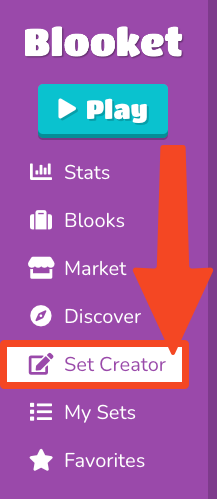
1. Create or pick a set. Sign up free at blooket.com, then build a set or search Discover for a ready-made set.
2. Choose a game mode. Pick a mode that fits your time. Racing suits five minutes. Gold Quest suits a full review.
3. Host and share the code. Click Host. Blooket shows a join code and a QR code for students.
4. Track results. Watch the live standings, then read the report to see what your class needs next.
Every game mode explained
Blooket offers more than 25 game modes, and the list changes over time. Learn how to play Blooket and pick the best game mode for your class.
The steal-heavy crowd favourites
Gold Quest: Answer well, then pick one of three chests. A chest can hold gold, a swap, or a steal.
Crypto Hack: Mine crypto with correct answers, then raid classmates by guessing their password.
Deceptive Dinos: Collect fossils, with a choice to cheat for extras while others try to catch you.
The strategy and solo modes
Tower Defense: Earn coins to build towers against waves of enemy Blooks. You can also play it solo.
Tower Defense 2: A fuller sequel with more build choices. It rewards steady accuracy.
Tower of Doom: A card-battle climb up a tower, powered by correct answers.
Factory and Cafe: Idle-style resource games. In Factory, Blooks earn cash on timers. In Cafe, you serve customers and upgrade your menu.
The speed modes
Racing: Every correct answer moves your Blook down the track. First to finish wins.
Battle Royale: Head-to-head rounds where the faster correct answer takes the round.
Fishing Frenzy, Crazy Kingdom, and Monster Brawl: Calmer collection and survival games for younger players.
How do you win Blooket games?
Winning comes down to accuracy, mode skill, and timing. Raw speed only decides Racing and Battle Royale. Every other main mode rewards choices as much as speed. In Gold Quest, avoid leading early, because leaders draw steals. Stay in the middle, then push in the final minute. In Crypto Hack, build answer streaks before you raid. In Tower Defense, place towers at corners and upgrade a few towers deep. In Cafe and Factory, spend early. One habit beats every trick: play logged in, because guests earn nothing to keep.
What is the Blooket dashboard?
The dashboard is the home screen you land on after login. It holds your question sets, recent games, stats, classes, and the Market. Students see stats, token balance, the Blook collection, and the Market. Teachers see all of that plus set creation, Discover, class tools, homework, and reports. If most of the class missed the same question, that question becomes the next lesson.
What is the Blooket Discover library?
Discover is the public library of community-made question sets. It holds millions of sets across grades and subjects. Any account can search it, play sets solo, or host them live. Search by topic first, then judge quality before you host. Check the question count and the first few questions. The copy button makes any public set your own.
How do you make a good Blooket question set?
A good set uses short, clear questions, one clear correct answer, and enough questions that repeats stay rare. Set quality decides game quality. Keep questions short, because players read on small screens mid-game. Write wrong answers that look plausible. Aim for at least 20 questions. Test the set solo first to catch typos.
How do teachers host a Blooket game?
A teacher hosts by picking a question set, choosing a game mode, and clicking Host. Blooket then shows the join code and QR code. A free account covers a normal class size. Open the set and click Host. Pick a mode that fits your time. Set the timer or goal, and decide on random names and late join. Show the code and QR code, wait for the lobby to fill, and start. Games that will not start are usually fixed fast — see what to do if a game will not start in our guide.
Assigning Blooket as homework
Instead of hosting live, assign the set as homework. Blooket creates a link and QR code that stay open until you close them. Students join without accounts and play to a goal at their own pace.
Hosting settings worth changing
Turn random names on for younger grades. Use short games. Check the late join setting before you start.
What is a Blooket calculator and how do you use it?
A Blooket calculator estimates the tokens or XP you can earn, so you can plan how many sessions it takes to afford a Blook pack. Enter your average place, questions answered, and games per day. Use it before you sell duplicate Blooks too. Remember the cap: once you hit the daily ceiling, extra games earn nothing that day.
What are Blooket bots and should you use them?
Do not use Blooket bots. Bots are third-party scripts that flood a lobby with fake players or auto-answer questions. They are not an official feature. They break games for everyone, break Blooket terms, and the sites that share them often carry malware and phishing. Flooding a lobby gets the game ended and gets you removed. Repeat use risks an account ban. Answer bots are worse, because handing your login to a random script is how accounts get stolen. Hosts can fight back without bots. Use random names, cap player counts, and lock the lobby at start. End and restart a flooded game with a fresh code. Hacks that target live games are banned the same way.
Do Blooket hacks actually work?
Most Blooket hacks you see online either never worked or stop working fast. Coin makers and auto-answer scripts promise easy wins, but token earnings sit behind server checks and a daily cap. The real cost is high. Accounts flagged for tricks can lose progress or face a ban. Phishing versions harvest the Google login a student uses for school. The legal edge is simple: learn the set, play logged in, and use fair tactics.
What are Blooks and how does the rarity system work?
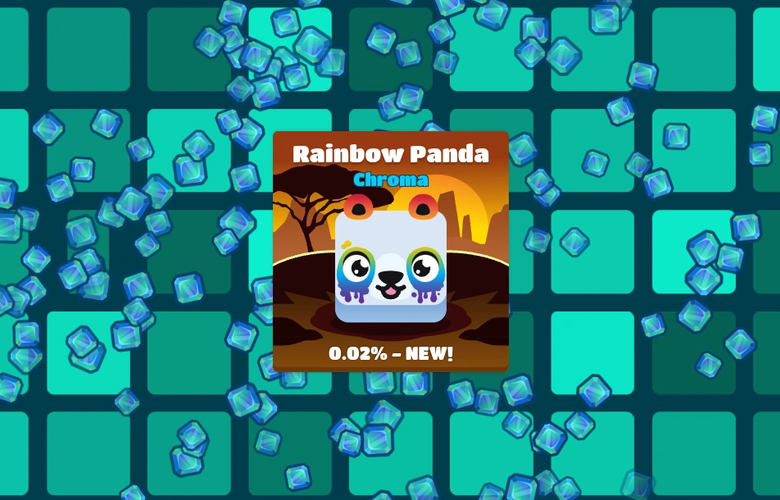
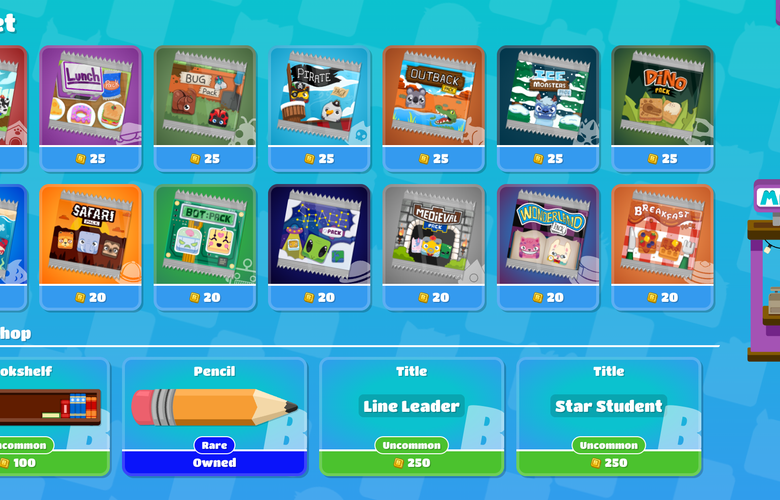
Blooks are the collectible characters that stand for you in every game. You unlock them by opening themed packs in the Market with tokens. Every account starts with free starter animals. Duplicate Blooks can be sold back for tokens. You can earn tokens and rare Blooks without hacks by saving tokens for event packs.
| Rarity | How you get it | Typical odds |
|---|---|---|
| Common | Free with every account | Guaranteed |
| Uncommon | Standard pack drops | High |
| Rare | Standard pack drops | Low |
| Epic | Standard pack drops | Single digits |
| Legendary | Standard pack drops | Around one percent |
| Chroma | Specific packs and events | Very rare |
| Mystical | Limited events only | Rarest |
How do you earn tokens and XP fast in Blooket?
The fastest legal method is simple: play full games while logged in, place high, answer as many questions as you can, and sell duplicate Blooks. Earnings stop at a daily cap, so consistency beats long sessions. Finish every game, because quitting early gives up the payout. Pick high-volume modes such as Tower Defense and Racing. Sell duplicates. Respect the cap.
How much does Blooket cost?
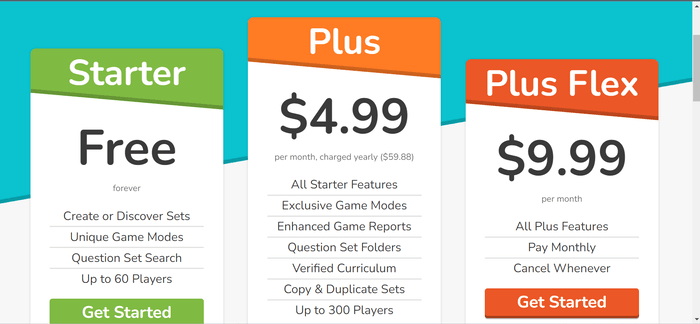
The core platform is free. Free accounts create unlimited sets, host every main mode, run homework, and cover a standard class size. Students never pay anything. Blooket Plus is an optional paid plan for hosts. It raises the player cap, adds Plus-only modes, and deepens reports. Prices change, so check blooket.com before you buy.
| Feature | Free | Blooket Plus |
|---|---|---|
| Question sets | Unlimited | Unlimited |
| Game modes | Most modes | All modes |
| Players per game | Up to 60 | Up to 300 in most modes |
| Homework deadline | Up to 14 days | Up to 365 days |
| Post-game reports | Basic | Detailed |
| Bonus tokens | No | Yes |
Blooket vs Kahoot vs Gimkit vs Quizizz: which is better?
No single tool wins for every class. Blooket wins on game variety. Kahoot wins on whole-class energy. Gimkit wins on deep strategy. Quizizz, now called Wayground, wins on formal checks. Kahoot rewards speed, which works for ten loud minutes and fades by week four. Blooket lets skill beat speed in most modes. Most teachers who try all four end up rotating them.
| Platform | Strongest at | Weakest at | Free tier |
|---|---|---|---|
| Blooket | Mode variety | Formal assessment types | Generous, most modes free |
| Kahoot | Whole-class energy | Repetition fatigue | Tighter player limits |
| Gimkit | Deep strategic modes | Cost, most features paid | Most features paywalled |
| Quizizz / Wayground | Question types, reports | Feels less like a real game | Solid for assessment |
Can parents use Blooket at home?
Yes. Parents can create a free account, browse Discover, and host games the whole family joins. Nothing about home use needs a school or a paid plan. Host from a laptop, let kids join on phones or tablets with the code, and turn a spelling set into a Gold Quest match. Preview a public set before you host, because quality varies. Keep the same account over time.
Is Blooket safe and private for schools?
Blooket is built for classroom use. Players cannot message each other inside games, hosts choose every question set, and guest play needs no student account data. Blooket says it follows COPPA rules for children under 13. Your school should still review the current privacy policy. The main risk sits outside Blooket. Third-party hack and bot sites can steal accounts. Teach one rule: students sign in only on Blooket own pages.
Common Blooket mistakes and myths
Myth: permanent working codes exist. They do not. Codes live and die with sessions. Homework links are the only exception.
Myth: coin makers can add tokens to your account. They cannot. Earnings sit behind server checks and a daily cap.
Mistake: playing as a guest every time. Guests earn nothing to keep. Logged-in players bank tokens and XP from every game.
Mistake: hosting long games. Energy peaks early. Two eight-minute games beat one twenty-minute game.
Mistake: ignoring the post-game report. The report shows which questions the class missed. Skipping it throws away the best data you get.
Blooket terms explained in plain language
Blook: Your character in the game.
Game ID / code: The number key to one live session.
Set: A bank of questions.
Host: The person who runs the game.
Tokens: In-game currency for packs.
XP and levels: Progress that unlocks custom looks.
Market: The shop where you buy packs.
Pack: A box with one random Blook.
Dupes: Duplicate Blooks you can sell.
Homework mode: A teacher task with a long link.
FAQs
Is Blooket free?
Yes. Accounts, sets, most modes, and homework are free. Blooket Plus is an optional paid upgrade for hosts.
Do students need an account to play Blooket?
No. Students join with a code, link, or QR scan plus a nickname. An account only saves tokens, XP, and unlocked Blooks.
How many digits is a Blooket code?
Join codes are numeric and usually run to seven digits. The code comes from the host and expires when the session ends.
Can you play Blooket by yourself?
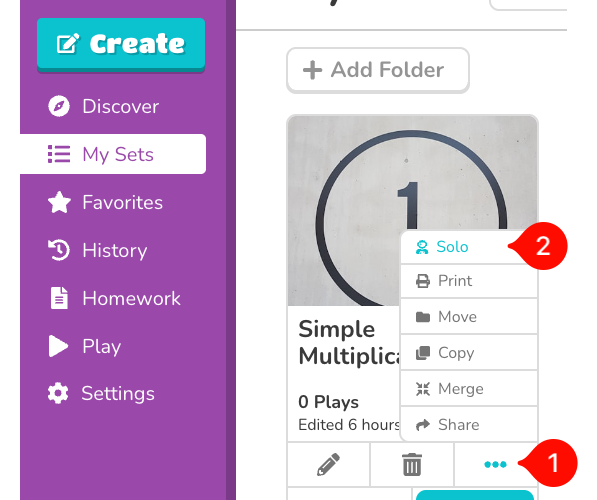
Yes. Solo modes such as Tower Defense, Tower of Doom, Factory, and Cafe run from your own account. Solo play while logged in still earns tokens and XP.
What is the rarest Blook?
Mystical Blooks from limited events are the rarest, followed by Chromas and Legendaries. Some event Blooks can no longer be obtained. Exact odds change by pack.
Why can I not join a Blooket game?
The code expired, the lobby locked, the game hit its cap, you mistyped a digit, or your network blocks play.blooket.com. Confirm the code with the host first.
Is Blooket safe for kids?
Yes. It has no player chat, host-controlled content, and optional random nicknames. Never enter your login anywhere except Blooket own pages.
Can teachers see your answers on Blooket?
Yes. Hosts get reports on each player accuracy and every question result. Teachers cannot see what you do in games run by strangers.
Conclusion
Blooket earns its place by making the game matter as much as the quiz. Students replay Tower Defense at home without being asked. Your next step takes twenty seconds: grab a code from a host or open a solo mode, pick a Blook, and play a round.
Blooketus.it.com is an independent, fan-made guide website for students, teachers, and parents. We are not the official Blooket website, and we are not affiliated with, endorsed by, or sponsored by Blooket Inc. or its founders in any way. “Blooket” and all related names, logos, characters, and game content are trademarks and property of Blooket Inc. All references on this site are made for informational and educational purposes only. To play the official game, create an account, or contact Blooket support, always visit the official website at blooket.com.